
 0 Comments

Let’s be honest — technology moves fast, and sometimes your old gear doesn’t keep up. You pull out that classic DVD player or retro gaming console, only to find your new TV says “Nope, I only do HDMI now.”
If your vintage equipment only has composite audio (those yellow/red/white jacks) but your TV only accepts HDMI, you’ve hit that familiar tech frustration moment.
That’s where HDMI to composite audio adapters come in — and Walmart is one of the easiest places to find them.
In this guide, we’ll walk through:
-
What HDMI to composite audio adapters actually do
-
How they work
-
What to look for when buying one at Walmart
-
Common mistakes to avoid
-
Tips for setup and best performance
No confusing jargon — just clear, practical advice you can actually use.
What Does “HDMI to Composite Audio” Actually Mean?
Think of it like a translator between different generations of devices.
HDMI is the modern all-in-one digital connection that carries:
-
Video
-
Audio
-
High definition signals
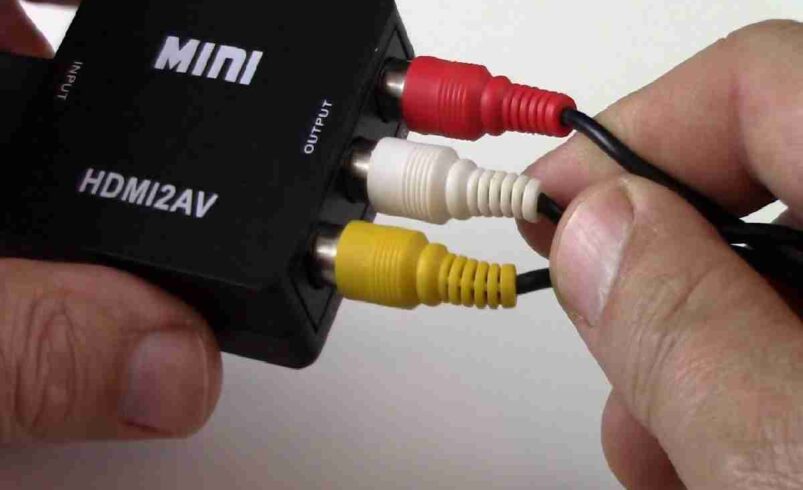
Meanwhile, composite audio is an old-school analog format — the kind you find on older TVs, stereo receivers, and vintage game systems — typically using:
-
Red plug (right audio)
-
White plug (left audio)
So when you hear “HDMI to composite audio,” what you’re really trying to do is:
Take a digital HDMI signal
Convert it to analog audio that older stereo gear or screens can understand.
That’s why simple cables don’t work — you need a converter box or adapter that translates between digital and analog worlds.
Why You Might Need This Adapter (Common Use Cases)
People look for HDMI to composite audio converters for all kinds of real-world reasons.
Here are the most common ones:
1. Connecting a New Media Device to an Older TV
Maybe you have a new streaming box or game console with only HDMI outputs, but an older TV that accepts composite audio. An adapter bridges that gap.
2. Using Old Speakers With Modern Gear
Your killer stereo system might have amazing speakers — but no HDMI input. With the right adapter, you can feed audio into your legacy stereo.
3. Retro Gaming Setup
Classic consoles (like older Nintendo or PlayStation systems) often output analog audio. If you’re combining them with newer HDMI devices, you might need an adapter just to get the sound working properly.
4. Projector or A/V Receiver Compatibility
Some projectors or receivers only have composite audio inputs — an adapter can help modern HDMI equipment play nicely with them.
How HDMI to Composite Audio Adapters Work (Simple Explanation)
At its core, these adapters do two big things:
1. Convert Digital Audio to Analog Audio
HDMI sends digital audio streams. Old audio inputs expect analog signals. The adapter translates one into the other.
2. Handle Format Differences
Digital and analog formats speak different “languages.” A converter decodes digital audio so older equipment can understand it.
Important note:
These adapters don’t magically add audio to video — if your device doesn’t output audio over HDMI, the adapter won’t create sound on its own.
Typical Features to Look for at Walmart
When you shop Walmart’s selection of HDMI to composite audio converters, keep an eye out for these features:
1. Support for Stereo Output
Make sure the adapter offers clear red/white stereo audio (left/right). Some low-end adapters only focus on video, which won’t help if you care about sound quality.
2. Power Delivery
Many converters require external power — usually via USB. Make sure the adapter comes with a power cable or mentions power requirements clearly.
3. Compatibility With Multiple Devices
Some units handle a variety of HDMI sources (streaming sticks, game consoles, Blu-ray players). Others are more limited. The wider the compatibility, the better.
4. Audio Sync Performance
Sometimes converters can introduce delay (audio that lags behind video). Look for options with minimal latency if you care about lip sync or games.
5. Simple Plug-and-Play Setup
Most users want something that doesn’t require complex installation. Check the packaging or description for “plug-and-play” and easy setup notes.
Before You Buy — Ask Yourself These Questions
You’ll save time and frustration if you think through a few key practical points before adding an adapter to your Walmart cart:
1. What Device Are You Connecting?
Is it a TV? Stereo? Projector? Confirm that the receiving device has the right composite audio inputs (red/white).
2. Does Your Source Output Audio Over HDMI?
Almost all modern devices do, but some need settings changed in menus. Make sure your source sends audio before converting.
3. Do You Need Video Conversion Too?
Some “HDMI to composite” converters also handle video, switching HDMI video to composite video (yellow). Decide if you need that or just audio.
4. Where Will This Adapter Be Placed?
Knowing this helps you choose the right cable lengths and power setup.
Common Mistakes to Avoid (And How to Steer Clear of Them)
If you’ve ever wrestled with cables and adapters, you already know that little things trip people up. Here are the common pitfalls:
Mistake 1: Buying a Passive Cable Instead of an Active Converter
A simple cable isn’t enough — audio won’t translate without an active converter box.
Mistake 2: Ignoring Power Requirements
Many converters need external power. Don’t assume they’ll work just by plugging in HDMI.
Mistake 3: Mismatched Inputs/Outputs
If your TV has only HDMI inputs and no composite, you’ll need the reverse type (composite to HDMI), not HDMI to composite audio.
Mistake 4: Not Checking Sync Performance
Audio that lags video is a common complaint — always check product reviews or descriptions mentioning lag performance.
Setting Up Your Adapter – Easy Step-by-Step
Most converters are pretty straightforward. Here’s a general setup that works for most systems:
-
Connect the HDMI source (e.g., media player) to the converter’s HDMI input.
-
Connect the composite audio cables (red/white) from the converter to your TV or stereo input.
-
Plug in power (if needed).
-
Select the correct input on your TV or stereo so it “sees” your audio signal.
-
Test sound and picture (if doing video too).
That’s it! Usually no software or drivers.
HDMI to Composite Audio Adapters – Common Types You’ll Find at Walmart
Here’s a snapshot of what to expect when you browse Walmart’s selection (or in-store aisles):
1. Simple HDMI-to-Audio Converters
Small boxes that take HDMI in and provide composite audio out. Ideal for older TVs and sound systems.
2. HDMI to Composite + Stereo Audio
These handle both audio and video conversion, perfect if you want both sound and picture in analog formats.
3. USB-Powered Converters
Some adapters draw power from USB — handy if you don’t have a free wall outlet nearby.
4. Multi-Input/Output Converter Boxes
Larger boxes with multiple ports for different cables — good for complex setups or multiple devices.
Walmart Shopping Tips for Audio Adapters
Here are a few smart ways to make the most out of your Walmart experience:
1. Check the Product Description Carefully
Look for mention of “HDMI audio extraction” or “HDMI to composite audio.”
2. Try In-Store Demos (If Available)
Sometimes display units let you test compatibility.
3. Look for Return & Exchange Flexibility
Adapters can be picky — a lenient return policy helps if it doesn’t fit your setup.
4. Ask Store Associates for Help
If you’re uncertain, a quick question to a Walmart electronics associate can save time.
5. Consider Cable Length
Measure your setup beforehand — no one likes a cable that’s too short.
FAQs – HDMI to Composite Audio Walmart
Q1. Can I use a simple cable instead of a converter?
No — plain cables won’t convert digital HDMI audio to analog composite audio. You need an active converter.
Q2. Does every HDMI device work with these converters?
Most modern devices do, but some require audio output settings to be enabled in menus.
Q3. Do I need external power for the adapter?
Many converters do require USB or wall power. Check product specs.
Q4. Will this affect video quality?
If you’re only extracting audio, video passes through your HDMI unchanged. If you’re converting video too, expect a standard composite quality image.
Q5. How do I fix audio lag?
Choose adapters that explicitly mention low latency, and avoid cheap converters with poor synchronization.
Final Thoughts – Choose the Right Adapter & Keep Your Tech Happy
Bridging old and new technology doesn’t have to be frustrating. With the right HDMI to composite audio adapter — especially one you can easily pick up at Walmart — you can unlock compatibility between legacy gear and modern systems without mystery or hassle.
Just remember this checklist:
-
Active converter, not a passive cable
-
Check power needs
-
Match inputs/outputs correctly
-
Measure cable distances first
-
Look for clear setup instructions
Do that, and you’ll be watching, listening, and enjoying your favorite media without headaches.